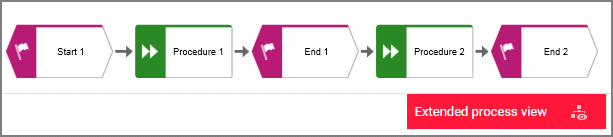
Modeling comprehensive processes
You can use the Change view function in the Diagram fact sheet to show different views on diagrams. This also allows you to choose the model-spanning extended process view, which displays models that are connected by process interfaces.
The models of EPC type must be connected according to the following schemes to use the benefit of the extended process view.
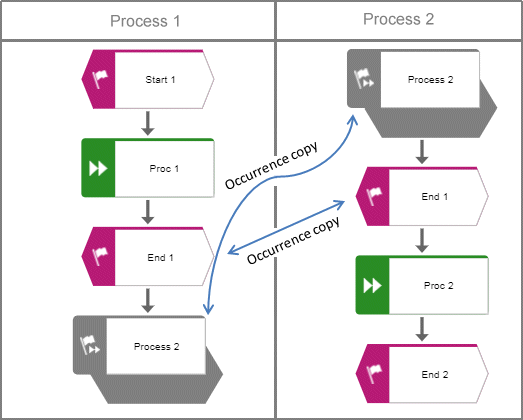
Process interface occurrence copy
Use an occurrence copy of the end event of the first model as the start event of the second model.
In the first model, place a process interface below the end event.
Copy the process interface of the first model and place its occurrence copy in the second model above the start event.
The following graphic shows the connection scheme of the models.
Process interfaces with assigned models
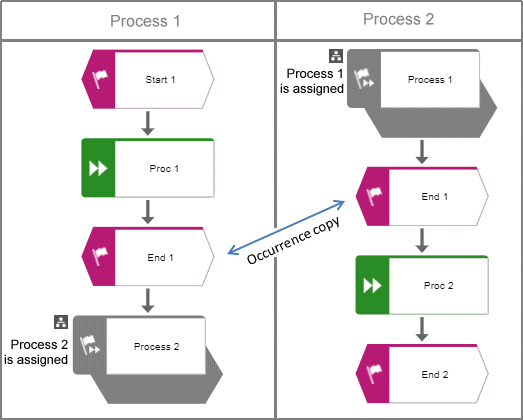
Use an occurrence copy of the end event of the first model as the start event of the second model.
In the first model, place a process interface below the end event and assign the second model to the process interface.
In the second model, place a process interface above the start event and assign the first model to the process interface.
The following graphic shows the connection scheme of the models.
If the Extended process view is activated for one of the two models, the following cross-model process is displayed.